


ChatGPT Video Generator: Create videos with Camtasia’s generative screencast plugin for ChatGPT
Manual video production can’t keep pace with the exploding demand for clear, up-to-date instructional content. Camtasia’s new generative screencast plugin for ChatGPT lets you upload screenshots and get a polished, high-quality training video in minutes.
The content gap
L&D, training, and enablement teams face rising demand for video, but traditional production pipelines are too slow and too complex to keep up.
A new category
Generative screencasting introduces an AI-powered capability that runs inside OpenAI’s ChatGPT to map out scripts, callouts, and cursor paths based on your actual screenshots.
Turn screenshots into videos in minutes
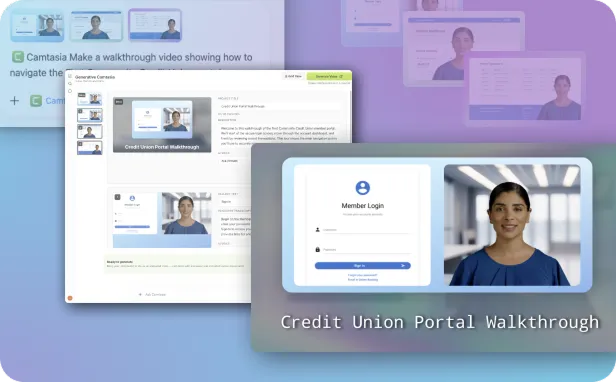
AI structures your screenshots and applies instructional best practices, getting your video most of the way there. As the subject matter expert, you have full control to review, verify, and refine before the AI video is generated.
Zero recording setup
Go from screenshots to a structured, professional training video without camera setups, mic adjustments, script-reading pressure, or endless retakes.
Instructional best practices included
AI can automatically generate a script, position smart cursor movements, and sequence details logically, so you never have to face a blank timeline.
Expert verification for accuracy
In instructional content, a few errors can compromise the entire lesson. Stay in control to easily verify content accuracy and make quick adjustments.
Seamless Camtasia Online handoff
Share finished videos immediately, or use Camtasia Online to edit and add effects.
Create a polished video in minutes: How it works
If you can take a screenshot, you can make a how-to video with the Camtasia ChatGPT plugin.
1
Upload screenshots and describe your video
Upload your screenshots into ChatGPT and add a short prompt describing the process you want to show. No recording, timeline, or setup required.
2
Refine your storyboard
Review and edit the AI-generated storyboard scene-by-scene. Adjust the script text, change the procedural flow, tweak callouts, and redirect cursor movements before generation.
3
Generate your video and continue in Camtasia Online
Your video generates automatically, complete with high-quality voiceovers, smooth transitions, and clean subtitles. Export immediately to share, or move it into the Camtasia Online video editor to polish.
Built for tutorials, training videos, and more
Create step-by-step software tutorials
Ideal for onboarding instructions, SaaS walkthroughs, and help center content, the Camtasia ChatGPT app turns static screenshots into finished videos in minutes.
Turn process documentation into training videos
Repurpose existing process docs, training guides, and text-heavy SOPs into stunning videos in minutes, without recreating anything.
Quickly update training content when things change
When interfaces or workflows change, just swap out the outdated screenshot and regenerate the storyboard, no re-recording required.
Create onboarding and how-to videos at scale
One consistent workflow makes it easy to produce branded, professional videos across multiple departments without the heavy production lift.
Create your first video in ChatGPT with Camtasia
Go from screenshots to engaging video in minutes and deliver effective training content at scale.
FAQs
The Camtasia ChatGPT generative screencast plugin lets you upload screenshots of a process and generate a structured video from them. It creates a storyboard with narration, cursor movement, and visual focus areas, which you can edit before generating the final video. Once ready, the video is produced and can be refined or exported through Camtasia Online.
No, the plugin is designed for non-editors. Instead of working on a timeline, you review and adjust a storyboard that outlines each step of the video. This makes it easier to create clear, professional training content without learning traditional video editing skills or tools.
Yes. If your process changes, you can update your screenshots and regenerate the storyboard instead of re-recording everything. This makes it much faster to keep training content accurate and up to date without starting from scratch.
You can start creating high-quality videos with the Camtasia ChatGPT plugin without needing to install the desktop editor. The plugin is designed as a frictionless entry point, allowing you to generate storyboards and videos directly inside ChatGPT. For more advanced editing, branding, or exporting options, you may be prompted to continue in Camtasia, where additional features and subscription options may apply.
Most videos can be generated in just a few minutes, depending on the number of screenshots and the complexity of your workflow. The process is designed to be much faster than traditional recording and editing, since the AI video maker handles narration, structure, and visuals automatically. You can then make quick refinements before exporting or sharing your video.