Camtasia vs. Descript
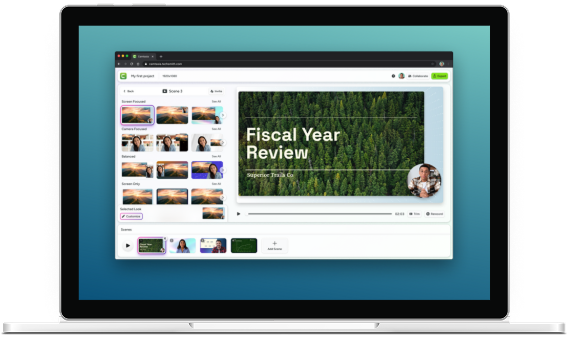
Descript is built for podcasts, but the Camtasia Suite is built for the screen. Get the speed of text-based video editing with the professional-grade precision of a real timeline.
Skip to text version of this table
| FEATURE |  |
DESCRIPT |
|---|---|---|
| FEATURE. Screen recording | Camtasia Essentials, Screen recording. capture, but lacks the control and post-recording refinements needed for polished software demos and tutorials. Purpose-built: Record your screen, camera, mic, and system audio with flexible capture areas, then refine cursor movement, clicks, and focus after recording. | DESCRIPT, Screen recording. Basic: Covers simple capture, but lacks the control and post-recording refinements needed for polished software demos and tutorials. |
| FEATURE. Cursor editing | Camtasia Essentials, Cursor editing. Precise: Smooth out shaky mouse movements, scale the cursor for visibility, and animate clicks after recording. | DESCRIPT, Cursor editing. Generic: The cursor is a flat part of the video file. You cannot adjust its path, size, or visibility once the recording is finished. |
| FEATURE. Recording and editing limits | Camtasia Essentials, Recording and editing limits. Unlimited: Record, edit, and produce video with no caps or limitations. | DESCRIPT, Recording and editing limits. Credit-based: Limits how many hours of video you can process or edit each month. |
| FEATURE. On-screen annotations | Camtasia Essentials, On-screen annotations. Professional: Use a library of callouts, arrows, and blur tools designed to guide a learner’s eye through a complex process. | DESCRIPT, On-screen annotations. Limited: Basic annotation tools that lack the instructional depth needed for complex software tutorials or tech tutorials or technical demos. |
| FEATURE. Documentation tools | Camtasia Essentials, Documentation tools. Integrated: Capture high-resolution screenshots to create step-by-step guides or pull static frames directly into your video. | DESCRIPT, Documentation tools. None: No native image support. You must use separate, basic capture tools that don’t allow for markup or library management. |
| FEATURE. Performance and stability | Camtasia Essentials, Performance and stability. Reliable desktop apps: Edit high-resolution projects locally with zero lag. Your work is not dependent on internet speed or browser stability. | DESCRIPT, Performance and stability. Cloud-dependent: Performance relies on your connection. Long projects are susceptible to browser crashes, lag, and sync errors. |
| FEATURE. Editing interface | Camtasia Essentials, Editing interface. Best of both worlds: Edit your video like a text document for speed, or via the timeline for frame-accurate visuals. | DESCRIPT, Editing interface. Text-only focus: Only text-based editing. The lack of a traditional, robust, timeline makes it difficult to time visual effects or precise transitions. |
| FEATURE. | Camtasia Essentials, . Get Camtasia Essentials | DESCRIPT, . |
Table content (text version)
Below is a plain-text summary of this comparison table. Each row lists the feature or row name, then each column’s value.
- Screen recording. Camtasia Essentials: capture, but lacks the control and post-recording refinements needed for polished software demos and tutorials. Purpose-built: Record your screen, camera, mic, and system audio with flexible capture areas, then refine cursor movement, clicks, and focus after recording.. DESCRIPT: Basic: Covers simple capture, but lacks the control and post-recording refinements needed for polished software demos and tutorials.
- Cursor editing. Camtasia Essentials: Precise: Smooth out shaky mouse movements, scale the cursor for visibility, and animate clicks after recording.. DESCRIPT: Generic: The cursor is a flat part of the video file. You cannot adjust its path, size, or visibility once the recording is finished.
- Recording and editing limits. Camtasia Essentials: Unlimited: Record, edit, and produce video with no caps or limitations.. DESCRIPT: Credit-based: Limits how many hours of video you can process or edit each month.
- On-screen annotations. Camtasia Essentials: Professional: Use a library of callouts, arrows, and blur tools designed to guide a learner’s eye through a complex process.. DESCRIPT: Limited: Basic annotation tools that lack the instructional depth needed for complex software tutorials or tech tutorials or technical demos.
- Documentation tools. Camtasia Essentials: Integrated: Capture high-resolution screenshots to create step-by-step guides or pull static frames directly into your video.. DESCRIPT: None: No native image support. You must use separate, basic capture tools that don’t allow for markup or library management.
- Performance and stability. Camtasia Essentials: Reliable desktop apps: Edit high-resolution projects locally with zero lag. Your work is not dependent on internet speed or browser stability.. DESCRIPT: Cloud-dependent: Performance relies on your connection. Long projects are susceptible to browser crashes, lag, and sync errors.
- Editing interface. Camtasia Essentials: Best of both worlds: Edit your video like a text document for speed, or via the timeline for frame-accurate visuals.. DESCRIPT: Text-only focus: Only text-based editing. The lack of a traditional, robust, timeline makes it difficult to time visual effects or precise transitions.
- . Camtasia Essentials: Get Camtasia Essentials. DESCRIPT:
TRUSTED BY 100% OF FORTUNE 500 COMPANIES





When to choose Camtasia vs Descript

Choose Descript if
- You are primarily recording a podcast or interview
- Your goal is transcription-only for a single voice track
- You do not need to show software or technical mechanics

Choose Camtasia if
- You need to record your screen for software training or onboarding
- You are an expert who wants to share your professional knowledge clearly
- You value a reliable desktop tool that works under tight deadlines
- You want a unified suite for images, videos, and audio.
What’s included in the Camtasia Essentials plan?
While tools like Descript focus on just one part of the process, the Camtasia Suite of tools provides everything you need to capture, edit, and share your expertise.

Camtasia Snagit
The industry standard for professional-grade screenshots, markups, and automatic step-by-step guide creation. You can create visual documentation that supports your training videos in seconds.

Camtasia Editor
The all-in-one screen recorder and video editor for professional, high-quality tutorials. You can add drag-and-drop effects, smooth cursor paths, and highlight key info with annotations.

Camtasia Audiate
The AI-powered hub for text-based editing and audio cleanup. It automatically generates transcripts, removes filler words, and lets you edit your video like a text document.
Top rated on G2
Camtasia consistently ranks as a top choice for ease of use, support, and video creation power.
Get the right tool for the job
Don’t fight with an audio-first editor when you can start using the suite built for screen-first training.