CHANGELOG

What’s new in Camtasia?

Turn on your auto-updates because our team is always cooking up something fresh.

Filter posts

Clear filters

Release Type

Operating System

Tags

April 2025

Image showing settings for visual noise effect.

Static Noise Visual Effect

Recreate the classic static interference reminiscent of disrupted TV signals or worn VHS tapes with a new Static Noise visual effect.

Ready to try it for yourself?
View Tutorial
Camtasia
MacOSWindows
Editing
2025.1.0
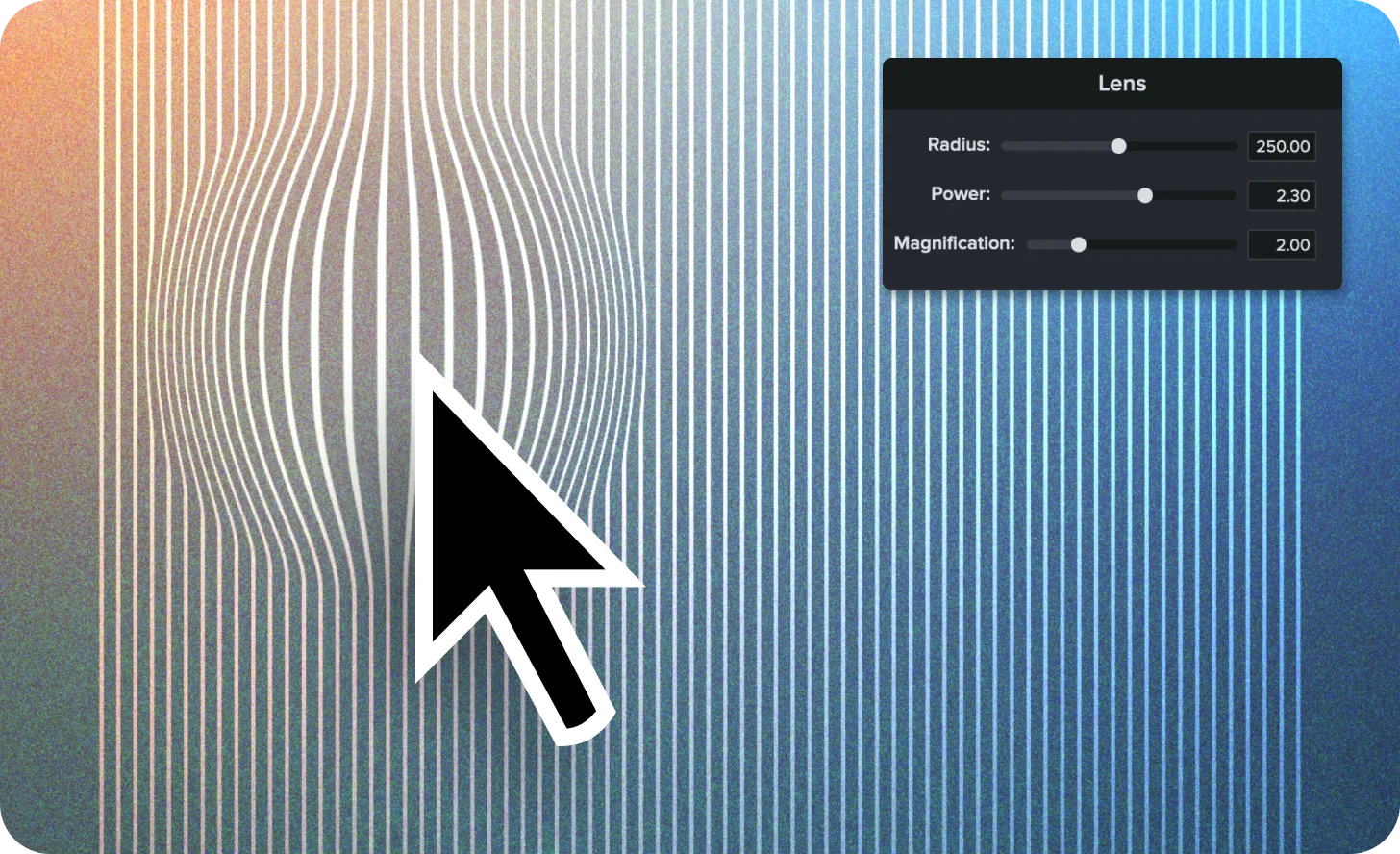
Mouse cursor with Lens effect applied.

Lens Cursor Effect

Instantly highlight your cursor movements in more ways with the new Gradient, Negative, and Lens effects.

Ready to try it for yourself?
View Tutorial
Camtasia
MacOSWindows
Screen RecordingEditing
2025.1.0
Mouse cursor shown without a background after cursor isolation is applied in Camtasia editor

Mouse Cursor Isolation

Isolate your cursor from the background it was recorded on, letting you easily swap out content without having to re-record your mouse actions.
Ready to try it for yourself?
View Tutorial
Camtasia
MacOSWindows
Screen RecordingEditing
2025.1.0

February 2025

Images of mouse cursors with motion blur, kinetic cursor, and cursor elevation applied.

Make Cursor Movements Look Cinematic with New Effects

Camtasia’s new cursor effects add motion blur, dynamic movement, and elevation to make your cursor clearer and more engaging in screen recordings.

Your cursor is one of the most important tools in a screen recording—now, Camtasia gives you even more control over how it moves and appears with three new cursor effects designed to enhance clarity and engagement.

New cursor effects:

  • Motion Blur Effect – Smooth cursor movement with a natural blur for a more polished look.
  • Kinetic Cursor – Add momentum to cursor movement, making it feel dynamic and fluid.
  • Cursor Elevation – Bring the cursor to the front, ensuring it remains visible above callouts, annotations, and effects.
  • Why you’ll love these new cursor effects:

  • Make cursor movements easier to follow in tutorials and demos.
  • Add a professional touch with smooth, realistic motion.
  • Keep the cursor visible and clear, even in complex visuals.
  • With these new effects, your cursor is more than just a pointer—it’s a storytelling tool.

    Try them out today and make your videos more engaging than ever!

    Ready to try it for yourself?
    View Tutorial
    Camtasia
    MacOSWindows
    Screen RecordingEditing
    2025.0.0
    Audio meter being adjusted to remove background noise

    Eliminate Distractions with AI Background Noise Removal

    Camtasia’s AI Background Noise Removal filters out distractions like fans, chatter, and clicks—keeping the focus on your voice.

    Background noise is unpredictable—whether it’s a lawn mower outside, a noisy fan, or unexpected interruptions at home. With AI background noise removal in Camtasia, you can isolate your voice and remove distractions without worrying about your recording environment.

    Unlike other tools, Camtasia’s AI noise removal effect isn’t permanent—you can adjust it anytime or revert to the original audio if needed.

    💡Ways to use AI background noise removal:

  • Eliminate distractions like fan noise, keyboard clicks, and background chatter from your audio.
  • Record anywhere without worrying about your surroundings..
  • Clean up audio after recording–adjust noise reduction levels or turn it off anytime.
  • Forget the hassle of re-recording due to unexpected noise. Record first, fix the audio later, and let Camtasia keep the focus on your voice.

    Ready to try it for yourself?
    View Tutorial
    Camtasia
    MacOSWindows
    AudioAI
    2025.0.0

    Live Camera Preview During Recording

    With Camtasia you now have the option to see your camera feed in a picture-in-picture window while recording, providing flexibility to move and adjust later without permanently burning it into the recording.

    Camtasia
    Windows
    Screen Recording
    2025.0.0

    Editing and Adjustments to Dynamic Captions

    Camtasia now provides expanded editing for dynamic captions including the addition and removal of words and spaces.

    Camtasia
    MacOSWindows
    Editing
    2025.0.0

    December 2024

    Bug Fixes for macOS Drag-and-Drop and Callout Behavior

  • Fix an issue that may cause drag and drop of files to fail on macOS 13.
  • Fix an issue with a default callout.
  • Camtasia
    MacOS
    Editing
    2024.1.3

    Resolved AVI Codec Decoding Issue

    Fixed a bug where certain AVI video codecs would fail to decode.

    Camtasia
    Windows
    EditingCollaboration
    2024.1.4
    An example of a video that includes an avatar that was generated in Camtasia Audiate.

    Sync Generate Avatar Updates from Audiate

    Sync updates from Audiate’s Generate Avatar feature in Camtasia to integrate dynamic avatars into your videos.

    Camtasia now supports receiving and synchronizing updates from Audiate’s Generate Avatar feature, enabling seamless integration between the two tools. Easily incorporate avatars into your videos and keep everything perfectly synced as you edit.

    💚 Why you’ll love this new feature:

  • Effortlessly synchronize generated avatars from Audiate to Camtasia.
  • Enhance your videos with engaging, dynamic avatar elements.
  • Save time by maintaining consistency between tools during edits.
  • Try syncing updates from Audiate’s Generate Avatar feature to bring a new level of creativity to your videos!

    Camtasia
    MacOSWindows
    EditingAI
    2024.1.4