








Most learning and development (L&D) leaders have gotten the same marching order: use AI to scale training production. Nobody’s handed them a clear answer for who reviews the output, who catches a wrong compliance date in an AI-generated caption, or who decides when a transcript edit changes the meaning of a course.
A human-in-the-loop framework answers those questions. In practice, it means AI handles the mechanical work, transcription, filler-word removal, voice generation, while a person keeps authority over accuracy, brand voice, and final approval before anything reaches a learner.
AI doesn’t remove that responsibility. It just moves it. If your team hasn’t named who carries it, and at what point in production they step in, the framework isn’t actually in place yet, no matter which tools you’re using.
This article gives you a concrete pilot workflow and a review structure you can put in front of your team this week, built around the point where AI brings its biggest benefit and its biggest risk at the same time.
Key takeaways
- AI adoption shifts the L&D leader’s job from managing production logistics to setting quality standards for AI-assisted content.
- The real bottleneck in scaling SME knowledge is the friction between an expert’s narration and a finished, accurate training asset, not content strategy.
- AI-assisted workflows keep the SME’s judgment in the finished asset, while fully automated workflows remove it and create accuracy and governance risks L&D leaders can’t accept.
- Decisions like who holds review authority over AI output belong to L&D leaders, not IT administrators.
- Piloting text-based narration editing with one SME before scaling to AI voice or avatar generation can help L&D teams build internal confidence deliberately.
What AI changes for L&D leaders
AI shifts an L&D leader’s job from coordinating production logistics to deciding who gets to say yes and setting the quality bar that makes AI-assisted training trustworthy. That’s as much a people change as a tooling change.
Deloitte’s 2026 Global Human Capital Trends research makes the point directly: adding AI to unchanged processes produces limited returns, and the harder part is redesigning the process itself.
For L&D leaders, that redesign comes down to three decisions:
- Who holds review authority over AI output before it reaches learners
- How your team enforces accuracy and brand standards consistently at scale
- Which workflows get AI assistance and which stay fully human
Getting those three right separates AI-assisted training your organization can trust from content that moves fast and creates risk.
Why SME knowledge capture is the real bottleneck
For most L&D teams, the main production bottleneck isn’t content strategy or learning management system (LMS) setup. It’s getting the undocumented expertise inside a subject matter expert’s (SME’s) head out and into a finished, accurate training asset, without eating their time or asking them to learn editing.
Other leaders see the same constraint. The TalentLMS 2026 L&D Benchmark Report found that “getting training content right” is a major obstacle to L&D effectiveness, and 88% of HR managers surveyed expect generative AI to change how long content creation takes.
AI assistance only scales safely when teams protect the SME’s voice and judgment throughout the process. That means defining review roles and quality standards before you deploy tools like Camtasia Audiate’s text-based editing. The bottleneck lives in people and processes. Tools alone won’t remove it.
AI-assisted vs. AI-automated: The difference that matters
AI-assisted production keeps a person in the loop. AI-automated production removes them entirely, and that’s exactly where the risk lives.
In a Camtasia Audiate workflow, the SME records raw narration, Camtasia Audiate transcribes it and strips out filler words, and the L&D team edits the text to fix errors before anything gets generated. The SME’s knowledge drives the content, and AI handles the mechanical work. Every editorial decision stays with a human reviewer.
An automated pipeline skips that review step and sends AI-generated output straight to learners. According to the same TalentLMS research, 22% of HR managers cite unreliable AI-generated content as a growing adoption barrier, and 36% of employees say AI tools are weakening their own problem-solving ability. AI-assisted workflows address both by keeping that review checkpoint in place.
Keep in mind that when you use tools like Camtasia Audiate to produce AI-generated output, including AI voices and avatars, you should stick to your organization’s AI disclosure policies.
From SME narration to finished training asset
A scalable SME-to-asset workflow needs a human decision point at every stage. The four steps below give you a framework for assigning ownership and controls.
Step 1: SME records raw narration
Whether it’s for a software walkthrough or a compliance training video, the SME’s only job here is to explain the process accurately. Filler words, hesitations, and imperfect phrasing aren’t problems to solve now. The next step handles all of that.
Use Camtasia Editor to record screen, camera, and audio in one session. Each source lands on its own track automatically, so the L&D team can edit narration, visuals, or both independently without touching the rest of the recording.
Record in short, modular segments instead of one long recording. When a process changes, you re-record only the affected segment. That choice pays off every time a policy update or software change triggers a content revision.
Step 2: AI transcribes and surfaces editable text
Camtasia Audiate turns the SME’s raw narration into an editable text document, so cleanup doesn’t need timeline scrubbing or waveform know-how. Once the transcript appears, the L&D team works directly in the text. Delete a word, and the matching audio disappears. That’s how filler words and stumbled phrases vanish without a single re-recording session.
Every edit is still a human decision. The transcript shows what needs attention, and a named reviewer chooses what stays and what goes. That’s what makes this AI-assisted editing, not AI-written.
Since you’ll typically be editing an AI-generated transcript in Camtasia Audiate, be sure to disclose the AI use. If you’re also considering AI voice generation at this stage, the same disclosure standard applies.
If you can edit a doc, you can edit a video
Stop fearing the timeline. Camtasia Audiate transcribes your recording so you can edit your video just by editing the text.
Free Download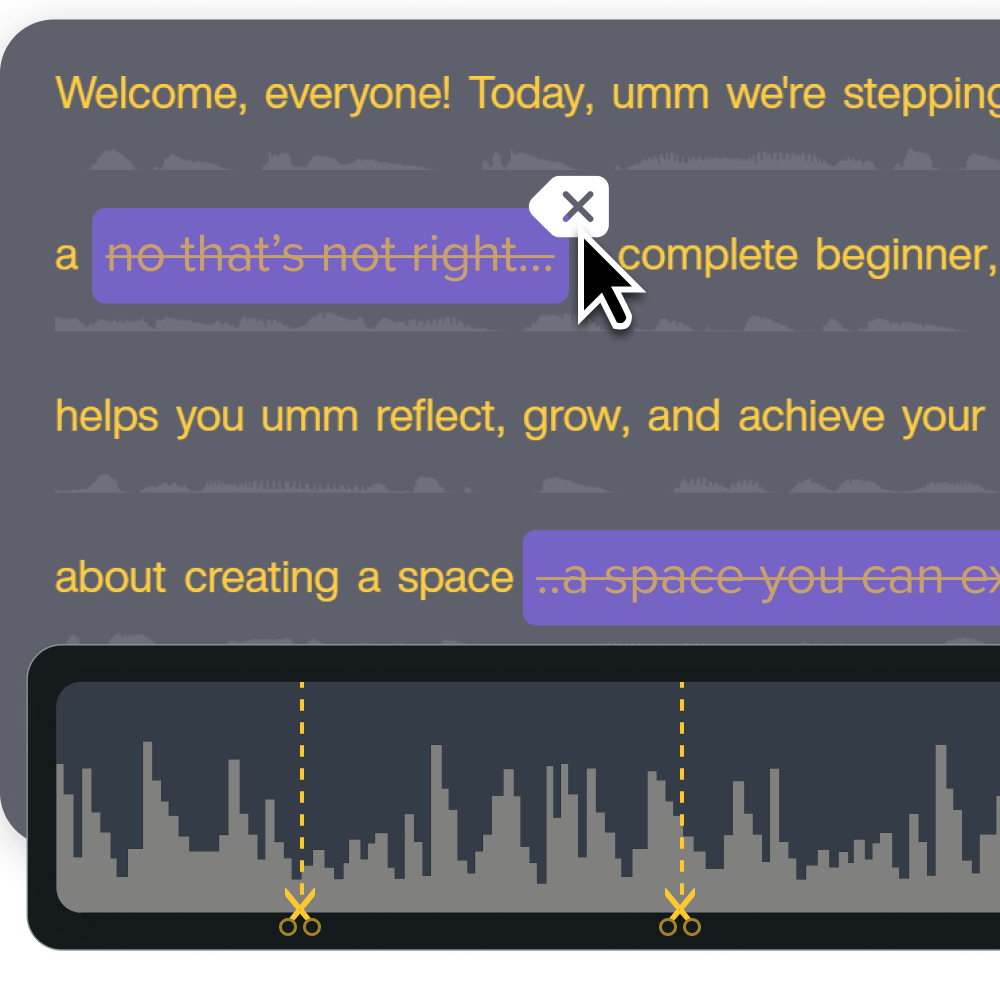
Step 3: L&D reviews and edits
A named reviewer on your L&D team reads the transcript, corrects any transcription errors, and checks that the content matches what the SME meant. This human checkpoint keeps accuracy intact before any AI voice or avatar output gets generated.
Once the transcript is clean, share the draft asset in Camtasia Screencast for SME or team feedback. Camtasia Screencast comments support collaboration, but they don’t replace the documented sign-off covered below. Keep your AI video quality assurance records in your organization’s own system.
Step 4: AI voice or avatar output is generated, then finished in Camtasia Editor
Once the team approves the reviewed transcript, Camtasia Audiate can generate an AI voice or add an AI avatar, and the asset then moves into Camtasia Editor for final assembly, branding, and export.
Match the format to the content type. For frequently updated how-to material, AI voice generation is the right fit, because updating the narration just means editing the text, with no re-recording required.
For soft-skills segments, intros and outros, or moments meant to re-engage a learner, an avatar overlay adds presence without crowding out the instructional content. Keep the avatar small, positioned as a picture-in-picture element rather than a full-screen replacement.
In a study of 700+ learners, avatar picture-in-picture placement produced the strongest learning retention for screen-based instruction. Plan for updates too, since keeping assets current is one of the biggest training video lifecycle challenges.
Instant lifelike AI voice over
No voice over? No problem. Audiate generates incredibly life-like voice over right from your script!
Get Audiate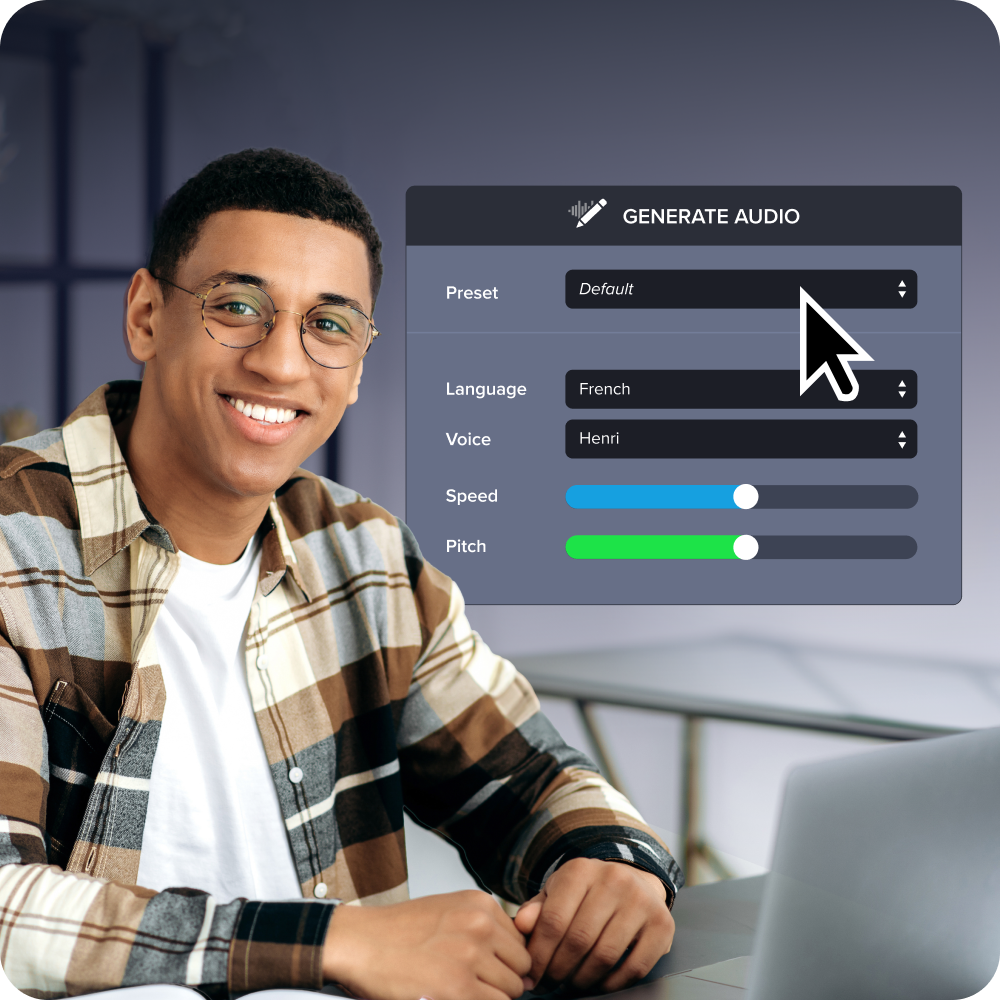
Decisions L&D leaders must own
L&D leaders own content-level oversight. IT controls technical deployment. That means L&D leaders decide who holds review authority, what accuracy and accessibility standards apply, and how AI-assisted content rolls out.
TalentLMS research shows a 19-point gap between HR managers (83%) and employees (64%) on whether their organization actively supports AI learning. What leaders say and what employees actually experience aren’t the same thing. The three decisions below are where that gap closes or widens. Your L&D strategy depends on getting them right.
Who holds review and sign-off authority
Name a specific person or role as the final reviewer for AI-assisted content before your team publishes anything. Treat this as a decision worth making on purpose, and settle it before production starts.
Match the reviewer to the risk. A compliance officer should sign off on regulatory training. An instructional designer is the right call for general skills content. An SME holds authority when accuracy depends on specialized knowledge.
When content spans more than one risk type, like an SME demo that also touches regulated claims, assign both reviewers and require sign-off from each before publishing. Document that assignment outside the tool, in your LMS, project tracker, or a shared review log, so it travels with the content.
Camtasia Screencast supports creator-controlled access and comments, which helps when you’re collecting feedback during review. It doesn’t provide a formal approval workflow, an approve/reject state, or a logged approval trail.
If your team uses a comment as an informal sign-off convention, record it in that same log, because a comment thread alone won’t hold up as an audit trail if anyone questions accuracy or compliance later.
Accuracy, brand, and compliance standards at scale
Consistent AI-assisted training depends on standards you define yourself. AI output reflects the quality of your inputs and your review process. The concerns raised above about unreliable AI-generated content don’t disappear once a tool is in place. The standards your team sets around the tool are what resolve them.
Camtasia Editor gives you three practical controls for brand consistency:
- Themes set your brand fonts, colors, and logos across every project.
- Templates save project structures your team already trusts, so everyone starts from the same baseline.
- Library assets store customized callout and title styles that any team member can apply right away.
None of these live in a centralized shared library. Teams pass them along by exporting files or bundling them into a Camtasia package, then importing them into each local Library. That file-based handoff is how your standards travel across the team.
Accessibility obligations and rollout order
Every training asset your team publishes carries an accessibility obligation, and that applies before any AI-assisted workflow scales beyond its first pilot.
Start with one SME narration recording and use Camtasia Audiate’s text-based editing to clean the transcript. Then check three things:
- Are the captions accurate?
- Does translated audio meet your organization’s video accessibility standards?
- Can a screen reader read the transcript?
Answer those questions at a small scale, where fixes are quick. Expand to AI voice generation or AI avatar use cases only after that pilot clears the accuracy and accessibility bar you’ve set.
AI-generated voices, avatars, and translated audio require disclosure per applicable platform and organizational requirements. For current Voluntary Product Accessibility Template (VPAT) and System and Organization Controls (SOC) 2 Type 2 documentation, visit the Camtasia Trust Center.
Start with SME narration, scale deliberately
The LinkedIn 2025 Workplace Learning Report found that 71% of L&D professionals are already exploring, testing, or using AI, and organizations with strong development programs are 42% more likely to be ahead of the curve on AI adoption. The order you tackle this in, more than how fast you move, is what sets those organizations apart.
Start with one SME and one training topic, and use Camtasia Audiate’s text-based editing to clean up narration before you add AI voice generation, avatars, or multilingual dubbing. That controlled pilot gives your team a working human-in-the-loop model, and every capability you add after that builds on oversight you’ve already proven works.
When you’re ready to test that workflow, start your first human-in-the-loop pilot with Camtasia Pro.
Keep training videos accurate. Avoid “AI slop.”
Build training content faster without sacrificing quality. The HUMAN Framework is a 5-step strategy for integrating AI effectively.
Get the Guide
Frequently asked questions
How can L&D teams update existing training videos faster using AI without re-recording SME narration from scratch?
When Camtasia Audiate has an AI voice narration in place, updating it is as simple as editing the text in the transcript, with no re-recording session required. That makes high-turnover content, like process documentation, policy updates, or software walkthroughs, much faster to maintain as conditions change. The modular, chunked recording approach helps too. If only one segment of a training video needs updating, you revise that segment and leave the rest of the asset alone.
What should L&D leaders evaluate before choosing between an AI voice and an AI avatar for training content?
AI voices and AI avatars are two separate capabilities, and the right choice depends on the content type and what your audience expects. AI voice generation works well for straightforward how-to content and high-turnover process training, where fast updates matter more than on-screen presence. AI avatars add value in soft-skills segments, intros and outros, or moments designed to re-engage a learner, but they work best as a smaller overlay alongside screen content rather than a full-screen replacement for instructional material.
What is the 19-point perception gap in AI adoption, and why does it matter for L&D leaders?
Research from TalentLMS found that 83% of HR managers believe their organization actively supports AI learning, but only 64% of employees agree. That 19-point gap shows what leaders say and what employees actually experience aren’t the same thing. For L&D leaders, it’s a warning sign. Rolling out AI tools without clear, consistent communication about how they work can leave employees feeling unsupported even when leadership believes it’s doing enough. Closing that gap starts with making decisions, like who reviews output, visible to employees.
Do L&D leaders need IT involvement to govern AI-assisted training content production?
Governing AI-assisted training content is mainly an L&D leadership responsibility. Decisions about who holds review authority, what accuracy and brand standards apply, and which content types suit AI assistance all belong to the L&D function. IT plays a role in deployment, data handling, and compliance infrastructure, but content-level controls, like who signs off on a transcript before AI voice generation runs, can’t be handed off to a technical team. Connecting those content controls to your organization’s compliance posture, such as SOC 2 Type 2 or VPAT documentation, is where the two functions need to work together.
How many L&D teams are already using AI, and what is slowing the rest down?
LinkedIn’s 2025 Workplace Learning Report found that 71% of L&D professionals are already exploring, testing, or using AI in their work. Access to tools isn’t what’s slowing the rest down. Per Deloitte’s 2026 Global Human Capital Trends research, the bigger barrier is redesigning the underlying process. A human-in-the-loop framework, with clear review and sign-off before any AI-assisted content reaches a learner, is built to address that redesign directly.
Share