










Documentation is rarely evergreen. The process changes, the UI updates, a policy shifts, and the guide sitting in your knowledge base now describes a workflow that doesn’t exist anymore. That’s not a search problem or a storage problem, it’s a documentation-and-reuse problem, and most platforms aren’t built to solve it.
A knowledge management system (KMS) is a platform that collects, structures, governs, and surfaces organizational knowledge so the right information reaches the right person when they need it. It’s different from simple file storage or search tools.
Most comparisons score systems on storage capacity and search relevance. Those criteria matter, but they skip the real question technical writers, documentation specialists, and knowledge-base professionals need answered: How well does this platform help people collect accurate information, organize it consistently, and reuse it before it becomes outdated?
This article compares eight systems based on how well they support documentation and reuse. It also provides five questions to help you evaluate other platforms.
Key takeaways
- No single knowledge management system scores well on both documentation and governance. Workflow-recording tools are best at creating visual guides quickly, while broader knowledge platforms generally offer stronger ownership, review, and retrieval controls.
- Scribe and Tango can generate step-by-step guides from recorded workflows. Teams should confirm whether their selected plans include assigned content ownership, recurring review requests, or alerts for potentially outdated guides.
- Guru’s verification interval system assigns named expert owners to Cards on a schedule, making it the strongest governance model for teams whose knowledge decays quickly.
- SharePoint’s AI retrieval depends on Microsoft 365 Copilot, a separately licensed add-on, so its real knowledge management cost runs higher than its base price suggests.
- A dedicated upstream recording tool can work alongside any knowledge management system, so teams don’t have to choose a platform based on recording capability alone.
How we scored these systems
The ranking scores every system on five criteria:
- Documentation support
- Structure and templates
- Governance controls
- AI retrieval
- Workflow fit for documentation teams
These criteria replace the storage-and-search checklists most comparisons rely on, which skip over how organizations actually document knowledge in the first place. Each of the eight entries below gets evaluated on all five aspects above.
1. Confluence
Confluence is a strong choice for documentation teams already inside the Atlassian ecosystem, where Jira integration and page-level governance make up for the platform’s manual-only content entry.
Against the five criteria, Confluence scores well on structure, governance, and retrieval. Spaces and templates give teams a consistent documentation framework from day one. Page ownership assignments and review reminders cut down on content decay, the top concern for teams maintaining large wikis (collaboratively edited sets of linked pages).
Atlassian Rovo semantic search on Cloud surfaces relevant pages without needing exact-match queries. Jira integration connects documentation directly to the work it describes, so engineering and product teams can link tickets to the pages that explain them.
What’s missing is built-in documentation support. Teams have to create process documentation manually or bring content in from an outside tool, which adds steps and slows down documentation for fast-moving software workflows.
If your team lives in Jira, Confluence’s governance and integration edge is hard to match. However, outside of Atlassian, the story changes quickly.
2. Notion
Notion works for documentation teams ready to build and maintain their own workflow from scratch. Its databases, linked views, and templates give you structural flexibility, but none of it comes pre-configured for documentation use. You have to set it up, or it stays a blank canvas.
Against the rubric, Notion does not natively record live workflows as step-by-step visual guides. Templates need setup, and page permissions control access without triggering review cycles. Notion AI Q&A is a retrieval strength, pulling answers across the entire workspace. The catch is that it queries everything regardless of verification status, so outdated pages show up right alongside current ones.
Governance is the deciding factor for most documentation teams. Notion has no built-in staleness alerts. Content stays current only if your team remembers to check it.
For teams with the discipline to manage that, Notion may work well. For teams that need the system to prompt accuracy reviews, it may quietly accumulate outdated documentation.
3. Guru
Guru assigns named expert owners to Cards and prompts them to confirm accuracy on a schedule, building in accountability that page-restriction models in other platforms don’t match. For teams whose knowledge changes often, that scheduled review cycle directly counters documentation decay.
Against all five criteria, Guru performs consistently. Cards organize into Collections and Boards, giving documentation a predictable structure. AI-powered answers surface in Slack and Teams, so employees get verified knowledge without leaving their workflow. The browser extension delivers that knowledge inside support and sales tools right when they need it.
Guru’s browser extension clips web content into Cards, but it doesn’t record step-by-step software workflows natively. Process documentation still needs manual authoring or a separate recording tool.
If your team needs to document UI-driven procedures alongside fast-changing knowledge, understanding the difference between browser-based and desktop recording helps clarify where Guru’s approach falls short.
4. Document360
Document360 is built for external knowledge bases and help centers. Its Markdown and WYSIWYG editors, category hierarchy, and article templates give support documentation teams a clean authoring environment matched to how help content gets structured.
The platform’s role-based publishing states are its clearest structural advantage. Content moves through defined draft, review, and publish stages, with different roles controlling each step. That cycle gives teams more governance than Confluence’s open collaborative editing or Notion’s flexible but unstructured pages, where review happens by convention.
Semantic search with AI-assisted matching also means published articles surface relevant results even when someone’s search terms don’t match the article title exactly.
Documentation support is where Document360 falls short. It has no native tooling for recording software workflows or generating step-by-step guides from a live process, so every article starts with manual authoring and needs a separate recording step before it ever gets published.
5. SharePoint
SharePoint may make sense for organizations already committed to Microsoft 365, where its documentation and governance features slot into existing infrastructure.
On the five criteria, content creation is manual upload and page authoring only, with no native workflow-recording support. Site templates and content types provide structure for documentation teams.
Approval workflows are available through Power Automate, but they need someone with workflow-automation skills to configure, which adds overhead compared to systems with built-in review cycles. AI-powered retrieval through agents in SharePoint requires either an eligible Microsoft Copilot license or organization-enabled pay-as-you-go billing.
Teams outside the Microsoft 365 ecosystem may find SharePoint expensive to justify and complex to configure. For teams already inside it, SharePoint can provide governance and AI-assisted retrieval, but approval workflows and agents may require additional configuration, licensing, pay-as-you-go billing, or IT support.
6. Tettra
Tettra fits internal teams that want verified answers surfaced directly in Slack, without anyone needing to open a separate knowledge base.
Its Slack-first delivery means employees get answers right where they’re already working, and the AI Q&A feature pulls only from verified pages. That link between retrieval accuracy and the verification workflow is a governance strength for fast-changing internal knowledge.
Against the rubric, Tettra supports manual page creation with categories, subcategories, and templates for consistent structure. Content ownership assigns expert authors to specific pages, and verification requests prompt those owners to confirm accuracy on a schedule.
But Tettra has no native workflow-recording or step-by-step guide tooling. Documenting a software process still needs an outside tool before anything can be authored inside the platform, which makes it a weaker fit for structured external documentation or process-heavy technical writing teams.
7. Scribe
Scribe records a workflow as you perform it and auto-generates a numbered, annotated step-by-step guide, exactly what documentation teams need for software process documentation.
Scribe offers customizable approval workflows and semantic search through an Enterprise Search API that connects a Scribe library to AI assistants and chatbots.
What’s still missing is content ownership and staleness controls. Approval workflows govern publishing a guide the first time. When the underlying process changes six months later, there’s still no mechanism to flag an existing guide as outdated or assign someone to keep it current.
8. Tango
Tango auto-records click-by-click workflows as numbered, annotated visual guides, making it a solid tool for documenting software processes quickly. Like Scribe, it handles visual guide creation well, and its guides embed in wikis and help centers without friction.
Portability options vary by Tango plan and export type. Teams should confirm whether their selected plan supports the standalone formats they need, such as PDF or image exports, or whether the workflow relies primarily on hosted links and embeds. This matters when an organization requires documentation assets to live inside a single, governed knowledge base.
Tango has a search bar inside its own workspace for finding existing guides, and it uses AI to auto-generate titles for new ones. It has no content ownership assignment or staleness alerts, so nothing in the system flags a guide when the underlying workflow changes.
Documentation-and-reuse scores for all eight systems
No system in this ranked set scores well on both documentation and governance. That’s the pattern the table below reveals, and it has implications for how you build your documentation stack.
This table brings all five rubric questions together in one place, making it easy to see where each platform shines, where it relies on integrations, and where your team may need a workaround.
| System | Documentation support | Structure and templates | Governance controls | AI retrieval | Workflow fit for doc teams |
|---|---|---|---|---|---|
| Confluence | Manual page creation; no native step-recording | Spaces, pages, and templates built in | Page ownership, restrictions, and review reminders | Atlassian Rovo semantic search (Cloud) | Deep Jira and ticketing integration |
| Notion | Manual entry; no structured workflow recording | Databases, templates, and linked views | Page permissions; no native review-cycle triggers | Notion AI Q&A across workspace | Flexible but requires custom setup for doc workflows |
| Guru | Browser extension clips web content into Cards | Cards organized by Collections and Boards | Verification intervals with assigned expert owners | Guru AI answers surfaced in Slack and Teams | Embeds in support and sales tools via browser extension |
| Document360 | Manual authoring; Markdown and WYSIWYG editors | Category hierarchy with article templates | Role-based publishing workflow with review states | AI assistive search with semantic matching | Built for external knowledge bases and help centers |
| SharePoint | Manual upload and page authoring only | Site templates and content types | Approval workflows via Power Automate | Microsoft 365 Copilot (licensed separately) | Tight Microsoft 365 integration; complex to configure |
| Tettra | Manual page creation; no recording tooling | Categories and subcategories with templates | Verification requests and content ownership | AI Q&A drawing from verified pages | Slack-first; answers surfaced without leaving chat |
| Scribe | Auto-generates step-by-step guides from recorded workflows | Structured numbered steps with annotated screenshots | Customizable approval workflows; no ownership assignment or staleness alerts | Semantic search with an Enterprise Search API | Embeds in Confluence, Notion, and help centers |
| Tango | Auto-records click-by-click workflows as visual guides | Numbered steps with annotated screenshots | No content ownership or staleness alerts | In-workspace search; AI-generated titles | Embeds in wikis and help centers; platform-hosted guides |
That pattern points to a practical fix. Pair your KMS with a dedicated upstream recording tool that works regardless of which platform you choose. If you’re weighing screen recording and documentation options alongside your KMS shortlist, that decision belongs earlier in the process than most teams place it.
Camtasia Pro: the recording layer for your KMS
Camtasia Pro isn’t a knowledge management system and doesn’t compete with any platform on this list. It works upstream of whichever system you pick, as the recording-and-production layer, turning documented workflows into assets your KMS can store, search, and govern.
Camtasia Pro, which includes Step Capture for documenting workflows and a video editor for turning recordings into training, can produce two outputs from a single workflow.
In Camtasia Snagit, use Step Capture to record the workflow. Then send the project directly to Camtasia Editor’s timeline, where transitions, callouts, cursor motions, and image animations get applied automatically. The result is both a static numbered guide and an editable training video.
This handoff requires the .snagx project file and Camtasia Editor 2026.2.0 or later with Camtasia Snagit 2026.3.0 or later. A flattened image can still be imported as media, but it will not retain the editable Step Capture structure or trigger the same automated workflow.
Narration can use either the SME’s own voice, cleaned up in Camtasia Audiate, or an AI-generated voiceover built from the transcript. Your content team can choose the approach that best fits the project. If you go with an AI voice, include a disclosure telling viewers the video uses AI-generated audio.
Camtasia Audiate creates an editable transcript that can be exported as a script or caption file. Teams can store those files with the finished video in their KMS, where the KMS’s own indexing and retrieval capabilities determine how the content can be found later.
Before a finished guide or video reaches whichever KMS you’ve chosen, Camtasia Screencast gives reviewers a place to leave time-stamped feedback and sign off on it.
Version control, audit trails, and formal approval workflows stay the responsibility of your chosen KMS. For a deeper look at building a full documentation-and-reuse strategy, see our knowledge management strategy guide.
Crystal-clear screen recording
Why settle for blurry screen content? Camtasia Editor’s screen recorder captures everything at up to 4K!
Free Download
Pick your system, document your knowledge
Before you commit to any knowledge management system, run it through these five questions:
- Does the platform support structured recording of live workflows, or only manual entry?
- Does it provide templates and hierarchy for structuring content consistently?
- Does it assign content owners and trigger review cycles?
- Does its AI retrieval surface contextually relevant results or just keyword matches?
- Does it integrate with the authoring tools, help centers, or ticketing systems your documentation team already uses?
The documentation-and-governance split, laid out across the ranking above, is a structural reality of the category. Your KMS handles storage, ownership, and retrieval. Something upstream handles the moment an expert sits down to document a process before that knowledge walks out the door.
Camtasia Pro supports that upstream step and feeds whichever KMS your governance rubric selects.
Close the gap between “we know how this works” and “we have it documented and on video.” Get started with Camtasia Pro today.
Build your next training video with Camtasia
Record your screen or camera. Then, use the video editor to add polish and clarity.
Learn More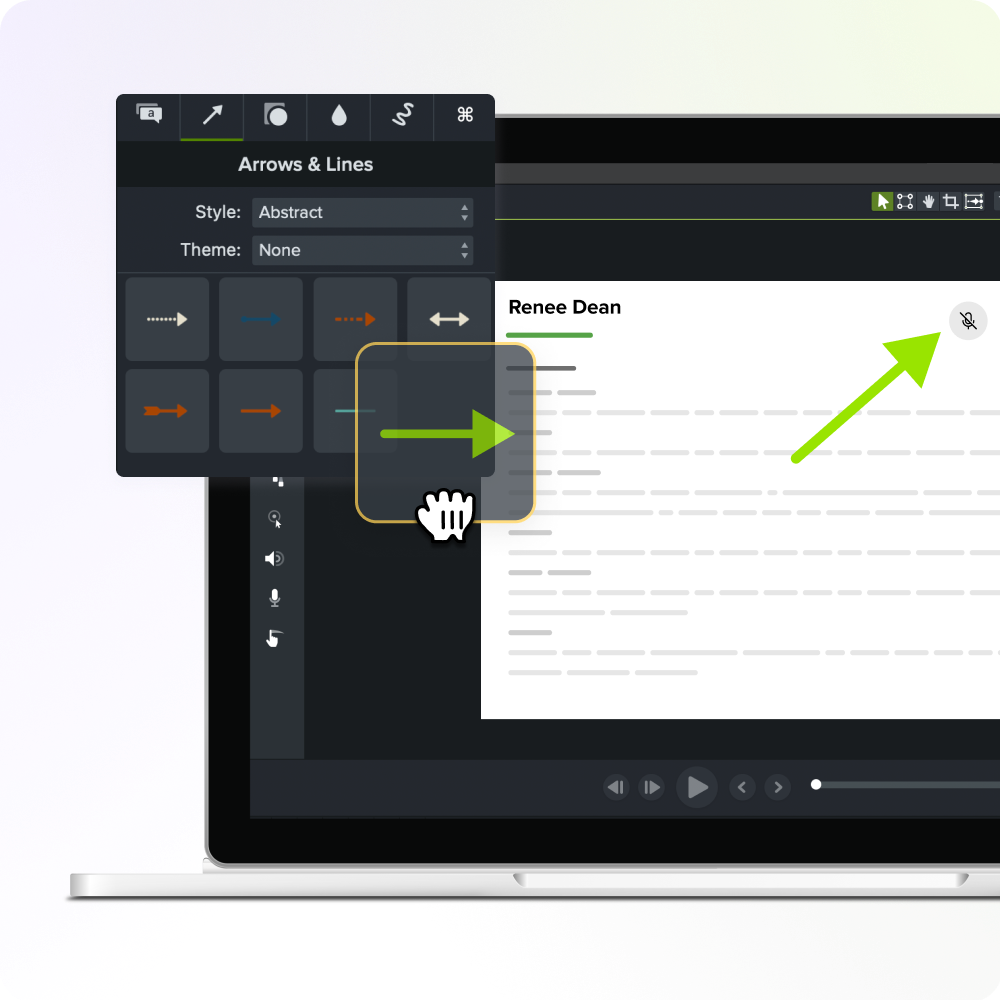
Frequently asked questions
What is the difference between a knowledge management system and a knowledge base?
A knowledge base is typically a searchable repository of articles, FAQs, or documentation, designed to help people find answers.. A knowledge management system is broader. It covers how knowledge gets collected, structured, governed, and surfaced. For documentation teams, this distinction matters because a system without governance and documentation support will accumulate stale content faster than it can get corrected.
Can a knowledge management system work alongside separate recording and documentation tools?
Most knowledge management systems are built to store and retrieve content, so pairing them with a dedicated recording tool is a common and practical setup. Software like Camtasia Pro, which includes Step Capture for documenting workflows and a video editor for turning recordings into training, sits upstream of whichever system a team selects for storage and distribution. This separation means teams can choose a KMS based on governance and retrieval fit.
How big is the knowledge management software market, and is it still growing?
The global knowledge management software market was valued at $20.1 billion in 2024 and is projected to reach $62.2 billion by 2033, growing at a compound annual rate of 13.6%, with North America holding the largest regional share at 37.3% in 2024, according to Grand View Research. That growth reflects rising demand from technical documentation teams and enterprise buyers who need structured systems for collecting and reusing organizational knowledge at scale. For teams evaluating now, the expanding market means more vendors and more differentiation, which makes a consistent evaluation rubric more useful.
What features should a knowledge management system have to prevent documentation from going stale?
The features that directly fight content decay are content ownership assignment, review-cycle triggers, and staleness alerts, which prompt named owners to verify accuracy on a schedule. Of the eight systems ranked in this article, Guru’s verification interval model and Tettra’s verification requests are the strongest examples of governance built into the platform’s core workflow. Systems that lack these controls, including Scribe, Tango, and Notion in its default configuration, put the entire burden of keeping documentation current on the people using the tool.
How do I evaluate a knowledge management system that isn’t on this list?
Apply the same five rubric questions used to rank the eight systems here:
- Does the platform support structured recording of live workflows, or only manual entry?
- Does it provide templates and hierarchy for structuring content consistently?
- Does it assign content owners and trigger review cycles?
- Does its AI retrieval surface contextually relevant results or just keyword matches?
- Does it integrate with the authoring tools, help centers, or ticketing systems your documentation team already uses?
A vendor should be able to explain how its platform addresses all five areas, including which capabilities are native, plan-dependent, or provided through integrations. Use those answers to identify the gaps another tool or process will need to cover.
Does Camtasia Pro work with Confluence, Guru, or Document360?
Yes, Camtasia Pro is KMS-agnostic by design. Step Capture guides and finished training videos export in formats that import directly into Confluence, Guru, Document360, or any other knowledge management system, so pairing Camtasia Pro with one of the eight systems ranked above doesn’t lock a team into a specific vendor choice.
Share