










One of the first decisions training teams face when onboarding new hires is whether to lean on live sessions or pre-recorded video. Both have their strengths, and even the most seasoned HR teams struggle to strike the right balance.
Live onboarding gives new team members real-time connection and interaction, helping build relationships early on. But it isn’t always scalable or consistent, especially as your hiring needs grow. Video onboarding, on the other hand, is efficient, repeatable, and easy to scale, though it offers fewer opportunities for in-the-moment engagement.
So, which approach will help you lay the foundation for a productive, helpful, and engaging employee journey? Let’s break down the pros and cons of each and explore how to use both effectively.
Key takeaways
- For most teams, employee onboarding video vs live is not an either-or decision. Video works best for repeatable foundational training, while live sessions work best for real-time connection, coaching, and questions.
- Video onboarding means using pre-recorded videos to deliver consistent training new hires can watch on their own time.
- Live onboarding means real-time sessions where new hires can interact with facilitators, managers, and teammates.
- A blended approach usually works best: use video for information every new hire needs, and use live time for discussion and support.
Why employee onboarding matters more than ever before
Employee turnover is expensive — not just in dollars but in time, morale, and momentum. When new hires leave quickly, it slows down teams, strains resources, and hurts company culture.
That’s why employee onboarding is a crucial part of the hiring process. Done well, it drives employee engagement, helps new hires feel connected, and sets them up to succeed in the long term.
Let’s look at a few reasons why onboarding isn’t a step to skip.
Onboarding sets the tone for employee success
First impressions matter — just ask brands like Apple and Nike, who are known for creating memorable customer experiences from the very first touchpoint. For new hires, the onboarding process serves the same purpose. It’s their first real look at your culture and expectations. Get it right, and you’ll build a team that sees your company not just as a stepping stone but as a place to grow.
69% of new hires who go through a structured onboarding program are more likely to stay in their roles for at least three years. But building a structured onboarding experience doesn’t have to be complicated — especially with the right platform. Tools like Camtasia Editor and Camtasia Snagit make it easier to build that experience and keep it consistent.
Camtasia Editor is perfect for companywide or long-shelf training content (like standard policies or company values), making it easy to create polished, professional videos. Camtasia Snagit is ideal for quick, team-specific training or capturing institutional knowledge that doesn’t need a full production. Its screen recording functionality is especially useful for walking through tools, processes, or day-to-day tasks.
With Screencast Collections, department trainers can upload short videos that give new team members easy access to helpful content at any time, helping that strong first impression last well beyond the initial onboarding phase.
Onboarding has changed in a hybrid work world
The pandemic reshaped work environments, pushing many companies to go fully remote.
Many have landed somewhere in the middle with a hybrid model.
But hybrid work naturally means fewer in-person interactions. New hires don’t always have the same easy access to teammates for quick questions, hallway chats, or spontaneous help they’d get in an office setting.
If you’ve adopted a hybrid model, it’s essential to rethink your onboarding strategy. Flexibility, accessibility, and consistency matter more than ever, and onboarding videos deliver on all three. They give new employees a trusted resource they can turn to any time they feel stuck.
With tools like Camtasia Editor, you can even make employee onboarding videos feel more personal. Features like avatar capabilities bring a human touch to remote processes, offering a creative, scalable way to help your hires feel connected, even without real-time interaction.
Onboarding must balance efficiency and engagement
One of the biggest challenges for onboarding teams is finding that sweet spot between covering everything new hires need to know and making them feel genuinely welcome.
A strong employee onboarding experience should do both: deliver essential training and foster a sense of belonging. That’s where video and live onboarding work best together.
Video onboarding helps drive efficiency. With Camtasia tools, you can keep training content up to date without starting from scratch. When a policy or process changes, simply update the section you need. Because Camtasia Editor records your screen, mic, system audio, and cursor separately, you have full control over every element. That makes it easy to keep content fresh and accurate while maintaining evergreen assets, so you can scale your onboarding process without sacrificing quality.
Live onboarding brings connection. It enables real-time interaction, helping new hires feel seen, supported, and part of the team from day one. But it’s harder to scale live sessions, especially when teams are spread across different locations or departments.
That’s why the most effective onboarding strategies blend both formats. Use video to create scalable, consistent content, and reserve live sessions for building relationships and answering real-time questions. It’s the best of both worlds for onboarding new hires in today’s hybrid work environments.
Comparing video and live onboarding: Pros and cons to consider
Both video and live onboarding have clear advantages and limitations, which can make the decision feel tricky. Video and live onboarding each have clear advantages and limitations, which can make the decision feel tricky. The good news? You don’t have to choose just one. Here’s a look at the pros and cons of each.
| Factor | Video onboarding | Live onboarding |
| Scalability | Easy to scale across onboarding cycles | Harder to scale across teams, locations, or schedules |
| Consistency | Delivers the same baseline training to every new hire | Can vary based on the facilitator |
| Flexibility | Lets hires learn on their own time and at their own pace | Lets facilitators adjust content on the fly |
| Personal connection | Offers fewer in-the-moment interactions | Builds real-time connection with managers and teammates |
| Feedback | Questions can be gathered asynchronously | Supports immediate questions and real-time feedback |
| Reuse value | Easy to reuse and update over time | Limited future value unless sessions are recorded |
Pros of video onboarding
Many HR teams already use employee training videos to explain policies, tools, and procedures. If you haven’t started yet, it’s worth considering. Here’s why:
- Scalability: Once you create an onboarding video, you can train dozens or even thousands of employees without additional time or effort. It’s a huge time and cost saver.
- Consistency: Video ensures every new hire gets the same high-quality baseline training, unlike live sessions that can vary depending on the presenter.
- Reusability: You can reuse video content across multiple onboarding cycles, making only minimal updates along the way.
- Asynchronous flexibility: Video onboarding gives new hires the freedom to learn on their own time, at their own pace. There’s no need to schedule around trainers’ calendars or sit through hours of onboarding in one go. If someone’s having a rough day, they can pause and pick back up when they’re ready, without missing a beat.
- Works for different personalities: Live onboarding often favors extroverts, but not everyone thrives in group sessions. Videos help level the playing field, letting hires watch, reflect, and even leave time-stamped questions — all without the pressure of live interaction.
Video is especially useful for standardized topics like tools, policies, systems, or workflows that don’t change often. For example, your team could use Camtasia Snagit to create quick training manuals or how-to videos and then save them in Collections for future onboarding cycles. For content that evolves over time, tools like Camtasia Editor let you easily update specific sections without starting over.
Build your next training video with Camtasia
Record your screen or camera. Then, use the video editor to add polish and clarity.
Learn More
While video can feel less personal than live sessions, it doesn’t have to be. With Camtasia Editor and Camtasia Snagit’s cloud-sharing platform, new hires can leave questions and comments right in the video, creating a feedback loop that feels more collaborative and connected.
And when used together, Camtasia Snagit and Camtasia Editor streamline the entire process. Use Camtasia Snagit to record your screen or take screenshots, add annotations, and obscure personally identifiable information (PII). Then drag that content into Camtasia Editor to build polished, high-quality onboarding videos that are easy to update and reuse.
Cons of video onboarding
Like any solution, video onboarding has its limitations. Some common drawbacks include:
- It may feel impersonal: Pre-recorded content lacks the personal touch of real-time human interaction.
- It often uses a one-size-fits-all approach: Unlike a live facilitator, video onboarding doesn’t easily adapt to different personalities or learning styles.
- Content can become outdated: Videos need regular updates to stay accurate, especially when policies, tools, or processes change.
Pros of live onboarding
Live onboarding shines in situations where flexibility and real-time interaction are essential, like covering complex topics or introducing company culture. Benefits include:
- Real-time interaction: New hires can ask questions and get clarification immediately.
- Personal connections: Direct interaction with team members, managers, and others helps new hires feel welcomed and engaged.
- Real-time feedback: Live sessions create space for instant feedback that helps improve the onboarding process.
- Flexibility: Facilitators can adjust content on the fly to meet the specific needs of their audience.
Cons of live onboarding
Of course, live onboarding also comes with its downsides — particularly in a hybrid or distributed work environment:
- Time-intensive: Preparing and delivering live content takes significant time and effort from facilitators.
- Difficult to scale: Coordinating schedules across departments or locations isn’t always practical, especially in hybrid work environments.
- Inconsistency: Live sessions often vary depending on the facilitator, which can lead to different onboarding experiences for new hires.
- Limited future value: Unless recorded, live sessions can’t be reused or repurposed for long-term growth.
Why video is the foundation of scalable onboarding
Video isn’t meant to replace live onboarding entirely, but it’s the best foundation for creating a consistent, repeatable program. It delivers a predictable experience across departments, locations, and hiring cycles, which can be difficult (if not impossible) to achieve with live-only processes.
Pre-recorded videos ensure every new hire receives the same baseline knowledge, no matter who leads the onboarding.
Video also gives you the advantage of scalability and asynchronous flexibility. Trainers don’t have to spend hours delivering the same presentation over and over. Instead, they can focus their live time on higher-value conversations — like coaching, Q&A sessions, or team introductions.
And because video onboarding isn’t tied to time zones or schedules, it’s ideal for remote and hybrid work scenarios where new hires may be scattered across different locations.
How Camtasia helps you create effective onboarding videos
Creating high-quality employee training videos doesn’t have to be complicated. Camtasia tools make video production approachable, efficient, and scalable for HR and training teams. Here’s how our technology can help you make great training videos.
Camtasia for polished walkthroughs and intros
Camtasia offers professional-grade screen recording and video editing tools designed to help teams create clean, organized, and visually engaging content — no advanced video production experience required.
It’s perfect for building onboarding videos like:
- Employee and management introductions
- Process walkthroughs
- Department overviews
- Software or tool highlights
It’s as approachable as building a presentation in PowerPoint.
Camtasia Audiate comes packed with powerful features designed to elevate the video onboarding process, including AI-generated script writing and voice generation.
- AI-generated script writing and voice generation: Camtasia Audiate is a powerful voice editing and transcription tool that takes the stress out of video management. It can generate scripts based on prompts, simplify narration, and speed up the video production process. It also supports accessibility and compliance by exporting captions and transcripts.
- Advanced audio editing capabilities: Record voiceovers and edit them like a text document, removing awkward pauses, filler words, and other non-valuable content to ensure clear, polished material.
- Customizable cursor effects: Smooth, highlight, magnify, or spotlight specific elements on the screen to guide new hires through processes and workflows.
- Camtasia features include motion path animations: Animate images or Lottie files to move across the screen in custom patterns — adding energy, clarity, and focus to your videos.
If you can edit a doc, you can edit a video
Stop fearing the timeline. Camtasia Audiate transcribes your recording so you can edit your video just by editing the text.
Free Download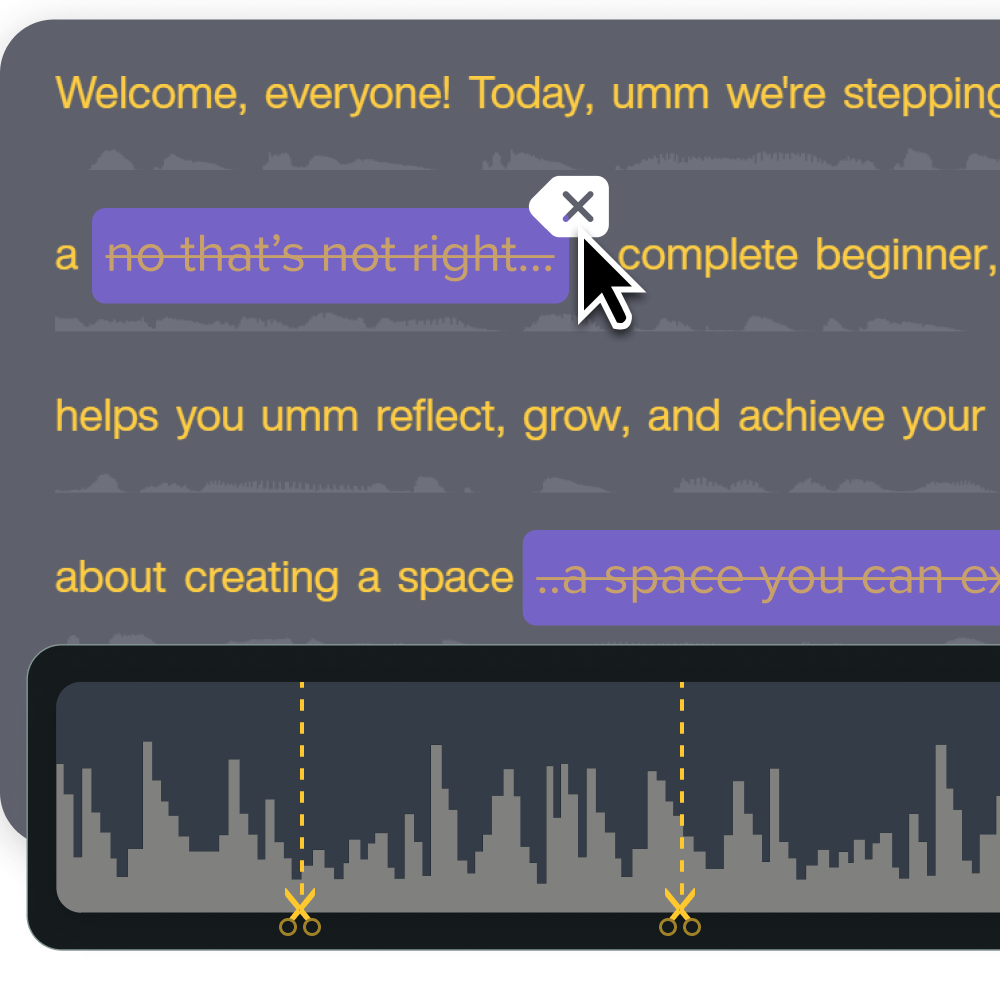
Camtasia Snagit for fast, annotated visuals and micro-training
Camtasia Snagit is the perfect sidekick to Camtasia Editor or Camtasia Audiate. It’s ideal for creating quick-hit training materials that complement longer onboarding videos or break down everyday tasks, giving new hires clear, visual guidance as they settle into their roles.
It’s particularly useful for quick guides on internal tools, standard operating procedures (like how to fill out a company form), and supporting visuals in training manuals or knowledge bases. In many cases, Camtasia Snagit bridges the gap between documentation and video, making task-based training more visual and accessible for new team members.
Camtasia Snagit offers a range of features that help streamline video onboarding processes. These include:
- AI-powered image editing: Edit text within screenshots, adjusting size, font, and color without starting over.
- Screen capture: Easily take screenshots and record short explainer videos.
- Seamless sharing: Generate custom links to share training materials directly with new hires.
- Annotation capabilities: Add text, highlights, or callouts to draw attention to key details.
Record your screen with Snagit
Snagit makes it easy to share quick updates and how-to’s by capturing exactly what’s happening on your screen.
Get Snagit
Combine the tools for a complete video onboarding system
Camtasia Editor and Camtasia Snagit are built to work together, supporting end-to-end onboarding. Camtasia Snagit makes it easy to capture quick screen grabs or record explainer videos. You can then bring that content into Camtasia Editor, using cursor effects and advanced editing tools to create detailed, engaging onboarding assets.
The best part? Both tools are scalable and easy to use, making them a smart solution for HR and training teams of any size and at any video production skill level.
When to use video, live, or both in your onboarding strategy
A great onboarding experience usually blends video and live formats, but knowing when to use each is key. Here’s a quick guide to help you decide.
Use video for repeatable, foundational content
Video is perfect for employee orientation and onboarding content, like company policies, organizational structure, employee benefits, and software walkthroughs. Repeating this type of information for every new hire isn’t the best use of your team’s time.
It can be monotonous for trainers and distract from higher-value tasks, like answering role-specific questions or building relationships. That’s where video is most effective. It helps HR and training teams deliver consistent, on-demand information while reducing the burden of live facilitators. The result is a smoother, more scalable onboarding experience for everyone involved.
With tools in Camtasia’s suite, it’s easy to create reliable, visual-first training content that grows with your team.
Use live onboarding for human connection and feedback
Live onboarding is great for fostering relationships with new hires and gathering real-time feedback. It’s especially valuable for team introductions, Q&A sessions, culture conversations, and role-specific coaching on processes that frequently evolve.
Blend both to improve efficiency and experience
Combining video and live delivery helps you scale your onboarding program without losing the human element. It creates space for consistency and personalization, while also supporting different learning styles and communication preferences.
Here are a few ways to make the most of both formats:
- Have new hires watch a pre-recorded standard operating procedure (SOP) video on day one, then follow up with a live session for discussion.
- Kick things off on the first days with a welcome video detailing your company history, culture, and employee benefits. Then schedule a live Q&A session or webinar to answer questions and build connections.
- Share short video tutorials that cover core software features, then meet for a guided walkthrough where you can offer deeper insights, tips, and context for fully leveraging the technology.
Turn onboarding into a scalable, consistent experience with Camtasia
Video and live training both play valuable roles in new employee onboarding. Use video for repeatable content — the things every new hire needs to know — and save live sessions for building relationships and real-time interaction.
Together, they give you a practical mix of consistency and connection. Video provides a scalable foundation that ensures consistency and frees up live time for more meaningful conversations. Live onboarding brings in the human element: real-time interactions, connection, and support as new hires get settled.
Video also gives you the advantage of scalability and asynchronous flexibility… you can track engagement through view counts.
With Camtasia Editor and Camtasia Snagit, it’s easy to create clear, polished, and accessible onboarding videos, even without a production team. These video onboarding tools are user-friendly, powerful, and designed to help you create valuable content that sets hires up for success in their new roles.
Ready to elevate your onboarding strategy?
Explore Camtasia today for video onboarding tools built to scale with your team!
FAQs
Is video or live onboarding better?
Neither format is always better. Video works best for repeatable foundational training, while live onboarding works best for real-time connection, coaching, and questions. Most teams get the strongest results when they use both.
What is video onboarding?
Video onboarding uses pre-recorded videos to deliver training new hires can watch on their own time. It helps teams keep core information consistent across departments, locations, and hiring cycles. It works especially well for policies, tools, systems, and workflows that do not change often.
When should you use live onboarding?
Use live onboarding when new hires need immediate answers, team interaction, or role-specific coaching. Live sessions also help facilitators adjust content on the fly and gather real-time feedback. They are especially useful for introductions, culture conversations, and Q&A.
Should employee onboarding use both video and live sessions?
For many teams, yes. Video can cover standard operating procedures, company information, employee benefits, and software walkthroughs before or between live sessions. Live follow-ups then create space for discussion, clarification, and human connection.
Share