










You spend hours researching, recording, and editing a video lecture, only to find that your audience stops watching halfway through. Sound familiar? For educators and creators working in higher education or developing online courses, this is a common and frustrating experience.
But don’t worry, there’s good news! Disengagement doesn’t mean your content is poor. Often, it’s about other factors like delivery, structure, or supporting materials. Even well-crafted lectures can underperform if they unintentionally overwhelm learners’ working memory, lack pacing, or fail to make personal connections.
Luckily, it’s easily possible to keep engagement high! By gaining a better understanding of the cognitive load, educational research, and some simple interventions, you can support your learners in asynchronous and online learning environments. Let’s explore how viewers disengage and how to design video instruction that keeps learners tuned in from start to finish.
What causes disengagement in video lectures?
The tricky part is that every group of learners is unique. Usually, first-time students and long-standing professionals will learn differently, and that’s okay. Luckily, certain patterns reliably predict student disengagement and offer the opportunity to fix your videos by completely redoing your course.
TechSmith’s Video Viewers Trends Report found that entertainment is a huge factor that keeps viewers engaged and watching videos. Twenty-two percent of respondents reported that they stopped watching the most recent instructional or informational video because it was boring or uninteresting.
The top four reasons? Monotone speech, not concise or efficient, video length, and off-topic rants.
The video is too long without visual or verbal variety
Lengthy lecture videos that maintain a single visual first, like a static slideshow with monotone narration, often lead to cognitive overload and viewer fatigue. Without variety in the visuals, the student’s attention drifts, and knowledge retention suffers.
To keep viewers engaged, add cursor effects, transitions, and other visual animations in Camtasia. This helps reset viewers’ attention and supports stronger learning outcomes.
Crystal-clear screen recording
Why settle for blurry screen content? Camtasia Editor’s screen recorder captures everything at up to 4K!
Free Download
Pacing is too slow or lacks clear structure
If a video meanders or lacks clear waypoints, students are more likely to disengage. When viewers don’t know what to expect or how far along they are in the learning experience, they lose interest.
A clear structure not only helps manage cognitive load but also supports learners’ executive functioning by allowing them to organize and mentally file new information. In higher education, where students often juggle multiple asynchronous modules, strong pacing is critical for retention and student learning.
The content feels too generic or irrelevant
Learners disengage quickly when examples feel disconnected from their real-world challenges or academic goals. For example, a nursing student might tune out of a lecture if every example relates to marketing. Relevant, applicable content is key.
This also applies when examples are too broad and, frankly, boring. Try to think outside the box a little while keeping it relevant to your audience.
Educational research, including work by Philip Guo, recommends including visual flow and movement into video tutorials and intermittently showing the instructor’s face when presenting slides.
Poor audio or visual quality distracts from the message
Unclear visuals, poor lighting, or distracting background noise can compromise student understanding of video content, even if the message is strong. It’s virtually impossible to focus on the content of a video if the audio is grainy, the visuals are undecipherable, or the video footage is shaky.
By investing a little time in setting up a video properly, you can avoid these issues right off the bat. Also, a video editor like Camtasia has audio cleanup features that allow you to remove filler words and background noise. This improves the production quality without needing professional production equipment.
How to keep your audience engaged from start to finish
Compelling educational videos don’t require flashy graphics or expensive equipment. The goal isn’t Hollywood production, but rather clear, accessible, and watchable content that supports student engagement and learning outcomes. These strategies work whether you’re developing a single online lecture or designing an entire asynchronous course.
Open with a clear hook and learning objective
Start your video with a quick overview. Go over what learners will gain and why it should matter to them. This sets expectations, motivates engagement, and connects to the learners’ real-world goals.
Clear objectives also give students a roadmap through the content and make it easier for them to monitor their own learning process.
Break the content into digestible segments
Rather than delivering an hour-long presentation in one take, break up your material into segments with natural transitions or title cards. This technique reduces cognitive load and gives students room to pause, reflect, or re-watch as needed while developing critical thinking skills.
Segmenting is a best practice in both online learning (or e-learning) and in-person teaching. This can reduce information overload and keep students’ expectations in check.
Vary your visuals with screen capture, examples, or on-screen text
Visual variation maintains attention and deepens understanding. Mix in webcam footage, real-world case studies, diagrams, and animated annotations to emphasize key points. Camtasia is an all-in-one screen recorder and video editor that allows users to do just that.
Use Camtasia to record your screen, webcam, audio, and cursor movements, then make edits to the video content to improve clarity and understanding.
Go from screen recording to polished video
A screen recording is just the start. Camtasia’s editor helps you add the callouts, animations, and edits you need to create a truly professional video.
Free Download
Richard Mayer’s research found that multimedia principles emphasize that dual-channel input in visual and verbal reduces cognitive load and boosts memory encoding.
Add energy with voice tone and pacing
A natural, conversational tone is often more engaging than overly formal or scripted delivery. Speak with energy and vary your pace to emphasize important concepts.
If you stumble a little along the way and inject some “umms and ahhs” into your video, don’t fret. Audiate is a text-based video editing tool that automatically transcribes your video and removes any hesitations for you. With just one click! This allows you to keep your tone friendly and tighten up delivery later for a more polished video.
If you can edit a doc, you can edit a video
Stop fearing the timeline. Camtasia Audiate transcribes your recording so you can edit your video just by editing the text.
Free Download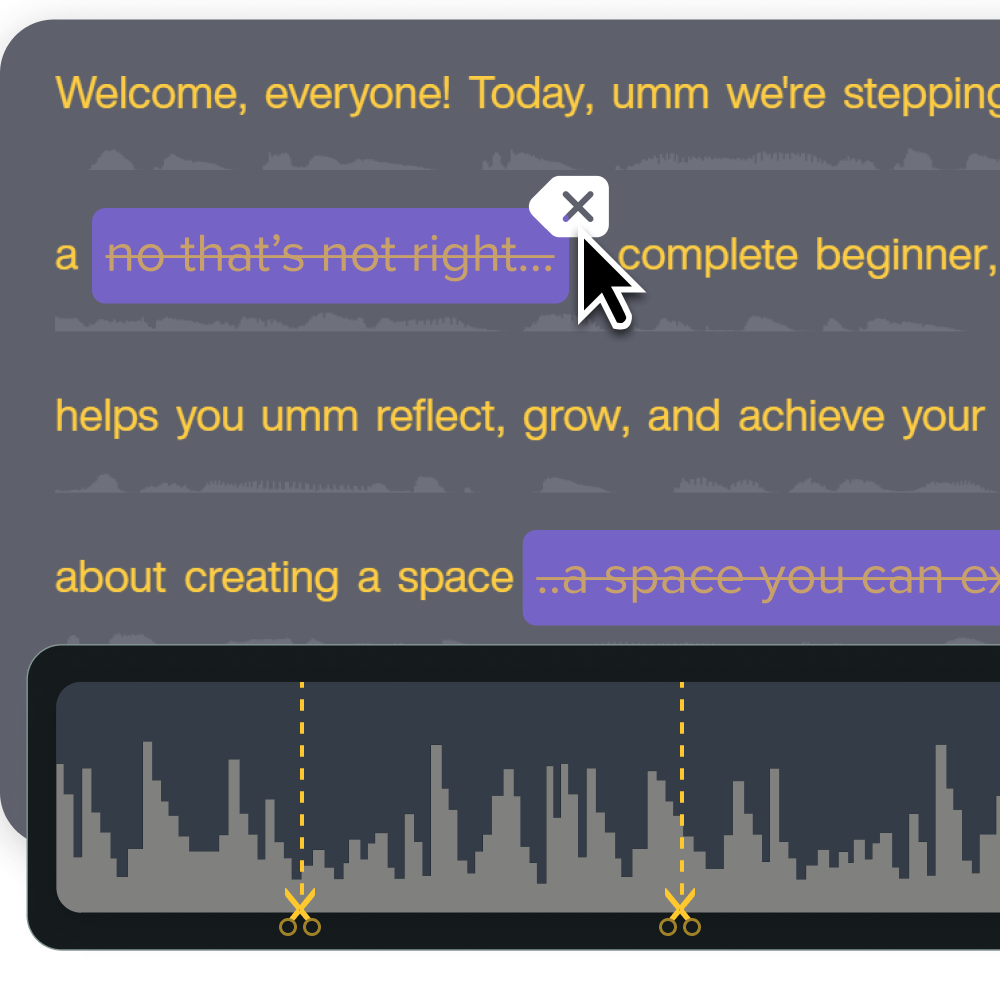
You can also remove distracting background noise with Camtasia’s AI. From your neighbor’s dogs, a lawnmower, or a small fan in the corner of the office, this feature will remove any distracting noise so your students can focus on your content.
Consider captions and interactive elements
Captions do more than improve access. They also support comprehension and retention, especially in really noisy (or really silent) learning environments. Many learners prefer watching online video content with captions, even in face-to-face or blended learning environments.
You can also go the extra mile by embedding short quizzes, prompts, or polls that encourage active learning and give learners opportunities to remember the content later.
Tips for measuring and responding to drop-off
Even with well-structured, relevant content, not every video will hit the mark the first time. What matters is learning from your data and refining over time. Luckily, educational technology makes it easier than ever to track, assess, and optimize student engagement.
Check analytics for average watch time and exit points
Pinpointing drop-off points in video metrics helps you understand when learners stop watching. These areas are a good place to pinpoint for improvement. For example, if you see a sharp disengagement at the 4-minute mark, you can revisit that section for possible confusion, pacing, or clarity issues.
There is usually a reason why people stop watching your videos, so knowing exactly when they do so is the first step to figuring out what got them to click off in the first place.
Ask for feedback through embedded forms or follow-ups
The most useful insights can come directly from your audience. Consider embedding lightweight surveys or exit prompts at the end of your lecture videos to ask learners what worked for them, what they did not like, and how you could improve.
This approach is valuable in higher education, where student perceptions often influence both satisfaction and learning outcomes.
Make sure that your feedback channel is open and constructive. Your learners should feel free to respond to your questions honestly without fearing repercussions or hurting someone’s feelings. Anonymous feedback is a great solution for this.
Update or remix your content based on insights
Frequent content updates support long-term value in online courses. If an example or technology becomes outdated, you can quickly update just that portion, keeping the content fresh and relevant without hours of rework.
This is also a great time to experiment with different teaching methods. Go over your video production methodology and teaching style, and try to find what works well and produces the best results.
To make this easy, use a modular screen recorder and video editor like Camtasia. Camtasia records your screen, webcam, audio, and cursor on different tracks so you can edit them independently. That means quick voiceover re-recordings and visual updates are possible in almost any video.
Keep your audience learning with the right educational technology
Disengagement in online lectures is a solvable challenge. By making a few thoughtful changes like improving pacing, adding visuals, and focusing on real-world examples, educators like you can drastically improve learner focus, satisfaction, and retention.
TechSmith’s Camtasia supports this workflow by giving users the flexibility to edit, rework, and reshare content without starting over.
Share